What's new.
Every change you'd actually notice, dated from the app's own commit history — and an honest note about which of them are in the installer today.
This list is generated from the build's commit log, so the dates are the days the work landed in the app's source, not marketing dates. Internal things — unit tests, build tooling, the admin panel — are left out. It starts on 22 July 2026, which is where the history stops being about a different product.
The installer on this site is the 24 July 2026 build, version 2.3.1.0 (86,726,597 bytes, served with a Last-Modified of 24 Jul 2026 16:00 GMT). Everything below dated 26 or 27 July is merged and tested in the source but is not in that installer yet — the MSI hasn't been rebuilt since the 24th.
We'd rather publish a changelog with that line in it than one that quietly implies you can download twenty features you can't. When the installer is rebuilt, the two lists below become one and this note goes away.
Merged and tested — not in the installer yet
In the source on the development branch, verified by the app's own build and test suite. Not yet packaged.
Buy or pass, decided in the driveway
Snap & Source takes a photo or a pasted listing link and answers in one word, with the most you can pay and still clear your margin. What makes it usable is the two answers it gives when it doesn't know: a thin-comp warning when the sold history it found doesn't carry the item's model or part number, and a flat can't price it when nothing matched at all. In testing it caught its own bad basis — an Antminer S19j Pro priced off comps that were mostly parts and accessories — and said so on the card rather than printing a confident number.
The desk version of the same question →The sourcing board reads itself, and stops caring what shape the item is
Deal Radar saves a search — what, where, how far, and the smallest profit worth driving for — then re-runs it every few hours, prices what it finds against the same eBay sold comps the rest of the app uses, and only interrupts you when something clears your bar. It is read-only: nothing buys, bids, lists or messages anyone. It reads each site once per scan, one scan at a time, never signs into anything on a schedule, and never alerts the same find twice. The figure on an alert is frozen at the moment it was found, because a classified is deleted the hour it sells and an alert that re-read its own listing would blank itself exactly when you want to know what you missed.
Sourcing also stopped assuming the item fits in a box. Cars, boats, RVs and anything else that never ships now run through the same pricing and profit rules, with the delivery side simply removed rather than fudged.
How the sourcing screens work →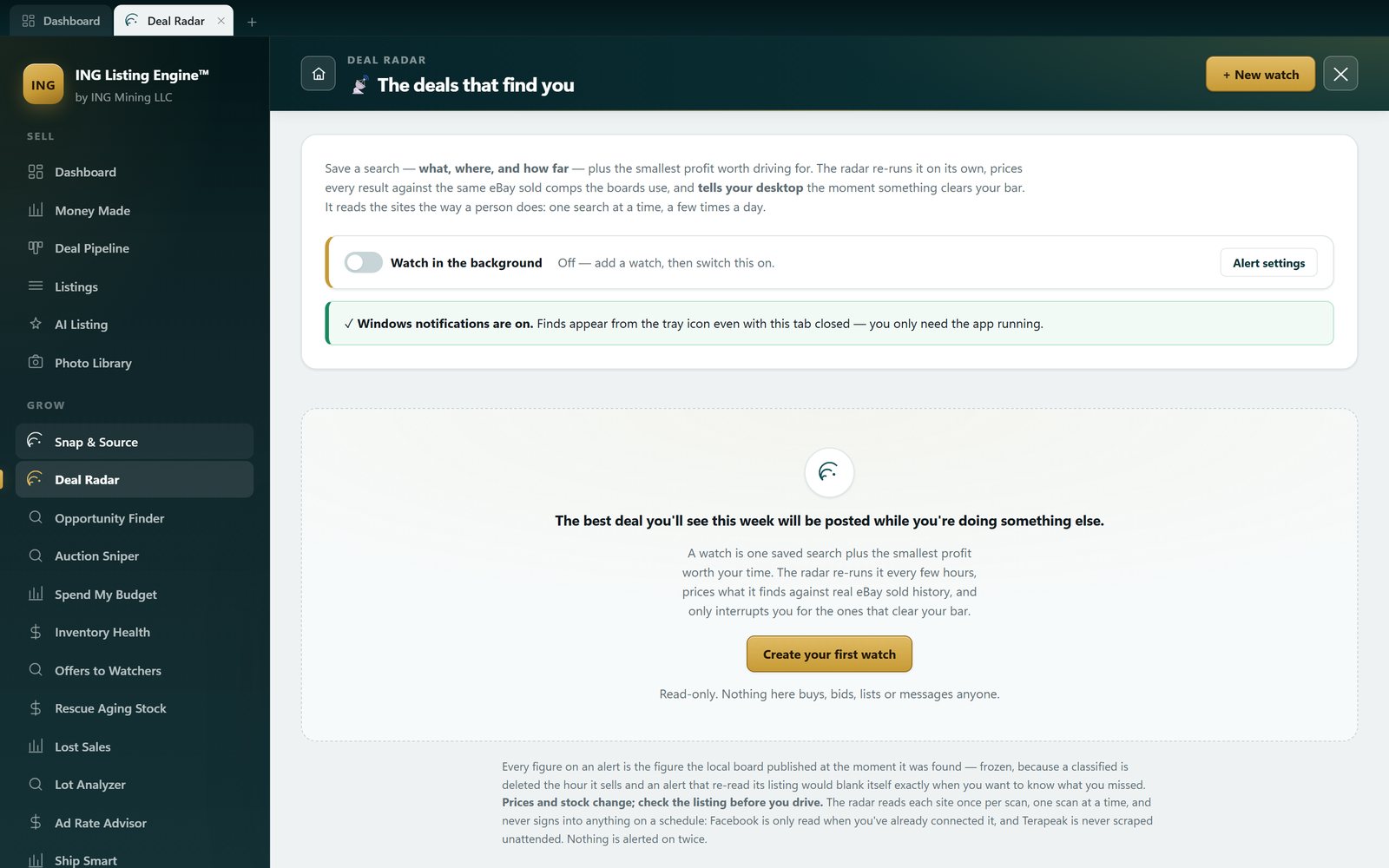
Setup asks for two things, and stops wiping the two things it asked for
A new install used to open Settings on Image Generation — a mode picker and a Stable Diffusion endpoint — above everything the app actually needs. Settings now leads with two required steps, each with a live saved/needed pill: your Claude API key, and your eBay business policies. Everything else moved into an optional section.
Underneath was a worse bug with the same shape. Because the save endpoint couldn't tell "this screen wasn't showing that field" from "this field is blank", saving the optional image settings cleared the required eBay business policies and every listing default. So did activating a licence. So did pasting an eBay token. The next publish then failed with an eBay error about a missing policy, on a screen that had never mentioned policies. Absent and empty are now different things.
What connecting the store gets you →One product instead of twenty screens
Every tool you open now stays open in its own tab. Before this, opening a screen closed the one before it — find a pallet on the Lot Analyzer, go price the parts, come back, and the manifest was gone and the scan ran again. Switching back to a tab does not re-run its scan, which matters because a finished board cost real eBay calls and comp lookups. Two screens are exempt on purpose (Logs and Licence re-read, because they are nothing but server state), and the Auction Sniper's countdown starts and stops with its own tab so no timer runs for a screen nobody is looking at.
The look caught up with the feature count in the same stretch. Twenty-odd feature sessions had each reached for whatever colour was to hand, leaving 157 distinct hex values and 406 hard-coded font sizes across 10,147 lines of CSS — generic web reds and greens on the profit figures, a navy-and-yellow photo editor, a slate-grey setup flow. Now every colour comes from one set of ramps (the raw values left are all plain white) and exactly one hard-coded size survives. On top of that: a motion pass so the app answers when you touch it, real charts instead of number grids, dense tables made scannable, a front page rebuilt from six stacked full-width bands into a masthead, three actions, a money row and a market pulse — and light and dark themes off the same tokens.
Nothing in this group changed a price, a rule or a number. Two known limits, since they're the kind of thing you'd otherwise report: open tabs don't survive a restart (the app reopens the one screen the URL names), and tabs can't be dragged into a different order.
See the dashboard →Percentages you can trust — and a $554 resale price that wasn't
A $60 trailer hitch on the Local Deals board was showing a $554 resale price and 698% ROI off one loose sold comp. Nothing on the row was arithmetically wrong; the price it rested on was worthless, and the board printed the percentage in the same typeface as one backed by twenty sales. That's the one row a seller drives to.
Two separate faults, fixed separately. The comp count on screen was never the comp count behind the price — a twelve-comp search that ended up pricing off one still displayed "12 sold comps", and every evidence check in the app trusted that number. And the identity guard, which filters comps down to the ones whose titles actually carry the item's model or part number, fell back to the unfiltered set whenever fewer than three survived — precisely the case where the filter was the only thing standing between you and a $74 fuse priced off $1,050 drives. Now three tiers, and only the top one is allowed to make a claim: a row with no model match is capped at thin at any comp count, and its figures are dimmed and labelled as estimates rather than deleted. Shipping cost also now lands on every price in the app instead of being the thing you remember afterwards.
Why keyword-matched sold averages mislead →Cheaper ways in, and a budget that gets spent properly
Five new sources, all priced through the same profit engine: retail and clearance stock when your town has nothing to sell you, businesses closing down and liquidating, things people are giving away, and used stock that still carries a warranty. Coupon and promo codes are now found and stacked before profit is computed, not celebrated after. And Spend My Budget allocates a fixed amount of cash across everything on the board by what it earns back, which is rarely the same answer as buying the single biggest deal.
The sourcing screens →Money already sitting on your shelves — and a banner that stopped crying wolf
Rescue Aging Stock works old inventory down on a schedule you'll actually follow, and Lost Sales goes after the sales that nearly happened: relists, plus Second Chance Offers to the people who bid and lost.
The crash-recovery banner also got its credibility back. Its test for "is this draft worth saving?" was a size check — under 400 characters and it was discarded. But an untouched blank listing form already serialises about 500 characters of defaults, so opening the AI listing screen, looking at it and closing it wrote a recovery row, and the next launch announced "an unfinished listing was recovered" over an empty draft called Untitled listing. Shown that twice, nobody reads the banner on the launch where it's holding a real listing. It now names the fields that carry your own work instead of weighing the bytes, and it judges existing rows when it reads them, so the banner is clean on the next launch rather than the next save.
Repricing the money stuck in live listings →Buying under market, and selling where the money actually is
Eight things landed in one evening, and they share a spine: every one of them is the same sold-comp math pointed at a different decision.
Auction Sniper works out the most you can bid on an eBay auction and still make your margin — and it never places the bid; the number is the product. Its first real scan over 69 live listings dropped 61 as not the same item and found nothing worth bidding on, which is the honest result and the one it reported. Where to Sell Highest compares venues instead of defaulting to the one you always use. The lot and pallet analyzer answers the only question a manifest raises: buy this, or walk. The Ad Rate Advisor picks a promoted-listings rate that keeps the most money rather than the rate eBay suggests. Trends shows what's climbing so you can buy it at last month's price. Boards began ranking by how fast the cash comes back, not by the fattest gross margin. Buy-side negotiation drafts the message and tells you where to stop. And take-home — all-in net, break-even and your offer floor — now sits on every price in the app.
The sold-comp data underneath all of this →Offers to the people already watching, and a way in when you don't know what to look for
Offers to Watchers sends a private, time-limited discount to the buyers watching a listing, at a price it works out from your own floor rather than a flat percentage. On our own account the first scan found 53 listings with watchers — 1,527 of them — and eBay cleared 31 of those listings to carry an offer. One honest limit worth stating: no real send has ever been fired from it. Every layer underneath was exercised, but the final click puts a non-recallable offer in front of real buyers, so it belongs to the account owner.
Roll the Dice is for the other problem — not knowing what to look for. It sweeps whole categories of real sold prices and then goes and finds where to buy the ones that clear.
Where offers fit next to repricing →Repricing the money already stuck in live listings
Inventory Health scans what you already have live and says which prices are holding cash. The first run against our own account read 87 active listings with a median age of 199 days. It also got three things wrong before the rules were tightened, and the best of them is worth repeating: a 138-day listing that looked 38% above market had actually sold 44 units and had 64 watchers, and the discount ladder wanted $105 off each of the 80 remaining — $8,400 off a listing that was working. Fixing that moved the stale-capital headline on the same inventory from $260,218 to $185,664.
Read the full write-up →Publishing that fails less, and a photo library
The app now asks eBay what a category requires before you publish, instead of finding out by failing, and it separates blockers from warnings rather than blurring the two. Failures became recoverable across the board: no silent errors, no lost drafts, no duplicate listings from a retry. A Local Deals scan can no longer dead-end — every source reports its own status and partial results still render.
Three small fixes in the same stretch, each the kind of thing that quietly wastes an hour: an eBay-only refresh was wiping the "AI key saved" tick; the eBay login window opened behind the app; and an unverified sell-through rate wore a green badge instead of saying low confidence — thin data. Also new: a representative photo library so used items reuse the shots that already work, with the used-item photo gate applied to the upload path too, and a cross-listing export for Facebook Marketplace, Mercari and Amazon.
How a listing gets built →Local sourcing, ranked by what you keep
Facebook Marketplace by zip code and radius, then Craigslist through the same pipeline — the arbitrage board stopped knowing which source a row came from, which is what made adding the second one cheap. Rows are ranked by profit after fees, not by the gap between the asking price and a sold price, because gross spread flatters heavy items and anything with a high fee load. The first real design pass landed here too: one design system, and real empty, loading and error states instead of blank panels.
What a photo can and can't tell you →In the installer you can download today
Version 2.3.1.0, built 24 July 2026.
Free public beta, and no pop-up in your face
The app became a free public beta — every feature unlocked, nothing behind a paywall — and the installer ships without any API key of ours in it; you bring your own Claude key, which is also why running costs stay yours and stay visible. The old startup Settings pop-up is gone: you activate from the home page when you're ready. Sold-comp pricing also stopped stepping between confidence buckets and now blends your local sold history with Terapeak on a smooth precision weighting, so one extra comp nudges the estimate instead of jumping it. Installer bumped to 2.3.1.0 so upgrades genuinely replace the old install rather than sitting beside it.
The full guide to the AI listing flow →The installer stopped behaving like server software
It no longer installs a Windows service — the app runs as the logged-in user, which is what a desktop tool should do. The local-DNS trick it used to pull (writing to your hosts file) is removed entirely, because nothing that wants to stay on good terms with your antivirus should be editing that file. The finish screen offers a checked-by-default "Open ING AutoLister now", and versions are bumped properly so an upgrade replaces the install.
On the pricing side, the sold-comps bar became permanent instead of appearing only when it had something to say, with a Connect-to-Terapeak prompt when it doesn't, seven comps shown in a larger bar, and the Terapeak login window raised so it stops flickering behind the app. Your own local sold history started feeding the average at a fixed 40% weight — which the smooth weighting on the 24th then replaced.
Connecting a real store →An editor you can work in, and a real installer
Listings gained a right-side edit drawer with market research inside it, so pricing and specifics stopped being a separate trip, plus keyboard shortcuts for the fields you touch on every item. An accessory-detection scoring bug was fixed — that's the code whose job is to stop a part or an accessory being scored as the machine it fits. And the app got a real x64 MSI with its icon embedded, instead of a folder you ran from.
Type a product name, get a listing →Anything not listed here is either internal (tests, build scripts, the admin panel) or older than 22 July 2026 — earlier notes are on the product blog. If a screen in the app does something this page doesn't mention, the page is wrong — tell us and it gets fixed.