
Paste a product link — or a photo of the item — and about ten seconds later the listing is filled in: title, 20+ item specifics, description, photos, and a price taken from real eBay sold comps. Review it, then publish straight to eBay.
No retyping specs, no hunting for a category ID, no second tab open on sold listings. You review what the AI filled and change what you disagree with.
Drop in any URL — your supplier's page, a manufacturer site, another eBay listing, Amazon, wherever you source product info. The AI reads the full page.
Claude AI writes a keyword-optimized title, professional HTML description, selects the right eBay category, fills 20+ item specifics, pulls all product photos, and estimates pricing from current eBay sold data.
Scan the AI-filled listing, make any tweaks you want, then hit Publish. The app connects directly to your eBay seller account via OAuth and creates the live listing instantly.
Real, unedited screenshots from the current build — click each tab to see exactly what you get.
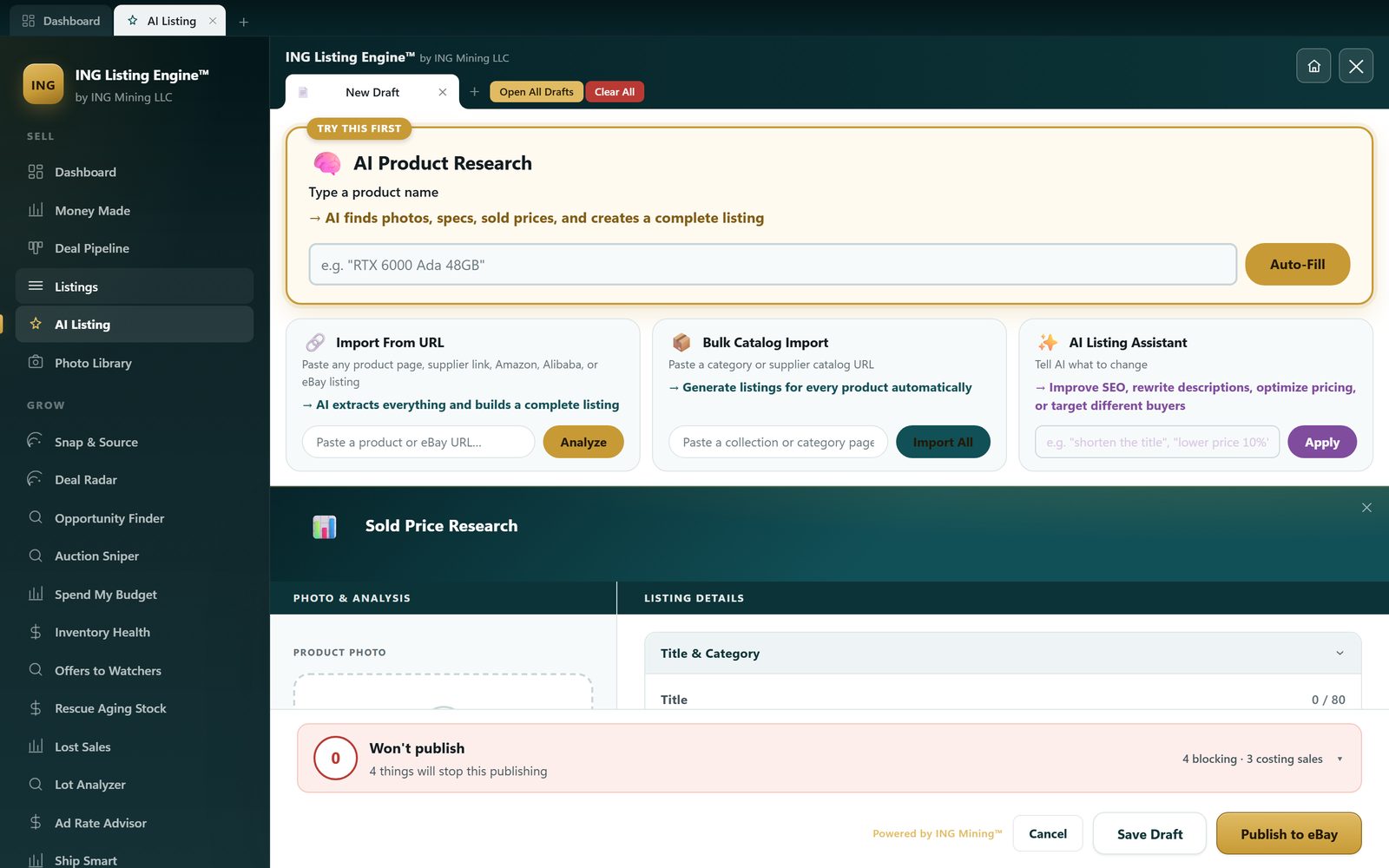
Three ways in, all on one screen. Type a product name into Quick-Fill, paste a supplier or marketplace URL, or drop a photo. The AI writes the title, the HTML description and the item specifics, and the sold-price panel sits right there while you work.
Connect the account and the app loads what you already have live — photos, price, quantity, listing ID, watcher count. This is the seller's own store: 87 active listings, mostly ASIC miners and datacentre hardware. Nothing here is a demo account.

Inventory Health scans what's already live, ages every listing, and compares your price to real sold comps. It proposes a new price — it never sends one. You confirm each change, or none of them.

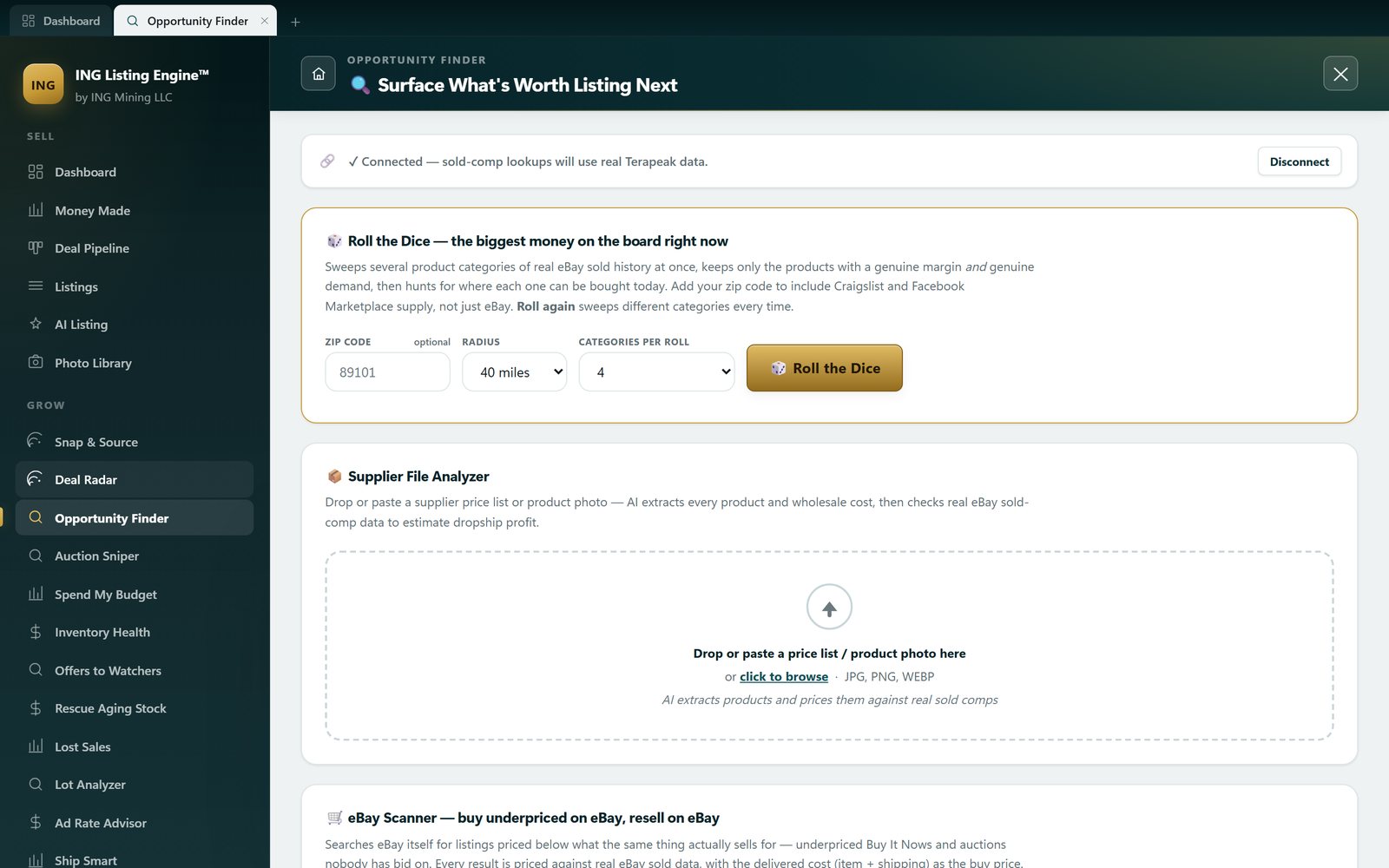
Opportunity Finder works the other direction: instead of pricing something you own, it sweeps real eBay sold history for products with both margin and demand, then goes looking for where you can buy them today — including Craigslist and Facebook Marketplace near your zip code.
Someone watching your listing has already decided they want it — they're waiting on the price. Offers to Watchers reads who is watching what, then sizes a private discount that still clears your break-even. Your public price never moves.

If you sell the same used model over and over, photographing every unit is wasted work. Shoot the model once, file it here, and every matching used listing reuses those photos with the representative-photo disclosure attached.

Every feature is included, unlocked, and free — no tiers, no upsells.
Paste any product URL and Claude AI reads the page, extracting all listing data automatically — works on any website without configuration.
Paste a supplier's category page and every product gets processed simultaneously into separate draft tabs — ready to review and publish.
Professional HTML descriptions with formatted spec tables, written to maximize eBay buyer engagement and search visibility.
Titles are generated under 80 characters with eBay search keywords included — using real eBay ranking signals.
20+ item specifics fields filled per listing including brand, model, MPN, and category-specific fields like hashrate for mining hardware.
Crop, rotate, adjust, add text, draw shapes, apply filters, and remove backgrounds — all without leaving the app.
Suggested pricing is estimated from current eBay sold comparable data — not just random guesses.
One click publishes your listing live to eBay via the official Sell API — no copy-pasting into Seller Hub.
Real, unedited screenshots of the app as it stands in development. Every change since 22 July, dated — and which of it is in the installer you'd download today — is on the changelog.
The new Quick-Fill box researches a product by name alone: finds a photo, writes a keyword-optimized title, and picks the eBay category automatically, with sold-comp research linked right alongside it.
Learn more →
Three ways in, all on one screen. Roll the Dice sweeps whole categories of real sold prices and then goes and finds where to buy them. The Supplier File Analyzer prices a wholesale list line by line. Local Deals searches Craigslist and Facebook Marketplace near your zip. Everything is ranked by how fast the money comes back, not just how big the margin looks.
Learn more →
This isn't a mockup — that's a live dashboard pulling real inventory and catalog value straight from a connected eBay seller account via the official Sell API.
Learn more →Written by sellers who move miners, servers and industrial gear — with real sold-comp numbers, not vendor claims.
How a photo becomes a complete listing, what a sold-comp median is really worth (a real Antminer S19 query moves from $69 to $290 once you filter it properly), and where a competitor is the better answer.
Read the guide →The six things a photo can never tell you — power-on, internal specs, battery health, firmware, hours, completeness — and how to shoot the spec plate so identification works the first time.
Read the guide →Four live queries against our own 864,000-row sold database. One search for a Dell PowerEdge R740 returned 30,289 “matches” and not a single actual server — which is why keyword-matched price averages mislead you.
Read the guide →The first scan of our own account found $260,218 sitting in stale listings — and one 138-day listing the discount ladder wanted to cut by $8,400 that had actually sold 44 units. Here’s what changed.
Read the guide →Sniping fixes the timing, not the price. The max-bid arithmetic after fees and shipping — three listings of the same miner came back with ceilings of $97.03, $57.03 and $31.85, and a fourth came back $0.
Read the guide →Twenty-two completed sales of one byte-identical listing title, from $175.50 to $455.00 — same model, same stated condition. What decides where in that band you land: the claim in your title, the firmware you disclose, and whether you sell it whole or part it out.
Read the guide →The one eBay discount that costs nothing when it’s refused. 53 of our own listings had watchers — 1,527 of them — and eBay cleared 31 to carry an offer. How deep to go, and the floor arithmetic that stops a 20% offer becoming a 20% loss.
Read the guide →A photo or a pasted link, and one word back — with the most you can pay and still clear your margin. Including the two answers it gives when it doesn’t know: a thin-comp warning that caught its own $85 price on an Antminer S19j Pro, and a flat “can’t price it”.
Read the guide →Where it wins, and where it doesn’t — measured against listing by hand in Seller Hub, and against the $20–$100/month tools.
| Feature | ING Listing Engine | Manual (eBay Seller Hub) | Paid Listing Tools |
|---|---|---|---|
| Price | Free (public beta) | Free | $20–$100/mo |
| Time per listing | ~10 seconds | 20–30 minutes | 5–15 minutes |
| AI-written descriptions | ✓ Included | ✗ Manual | ✗ Templates only |
| Item specifics auto-fill | ✓ 20+ fields | ✗ All manual | Partial |
| URL-to-listing import | ✓ Any URL | ✗ None | Supplier-specific only |
| Bulk import | ✓ Collection pages | ✗ None | ✓ CSV only |
| Built-in photo editor | ✓ Full editor | ✗ None | ✗ None |
| Pricing from real sold comps | ✓ In the listing flow | Terapeak, in another tab | Varies by tool |
| Cross-listing to Poshmark, Mercari, Etsy | ✗ eBay only | ✗ None | ✓ What they’re built for |
Everything you need to know before downloading.
Install it, connect your eBay account through the official OAuth flow, and paste in a single product link. You’ll see the title, the item specifics and the sold-comp price before you decide whether to publish anything at all.
⬇ Download ING Listing Engine — Free